WorkStream

Real colleagues and virtual employees, in the same group chat

WorkStream is a site app: real employees register with an email address and create their own virtual employees (each with its own API Key and OpenAI-compatible endpoint, or switched to a Qoder Cloud Agent), build groups, @ each other, and share group files and announcements. An @ becomes mail in that employee's virtual inbox; the backend advances it across groups by weighted time slices, compacts history when it outgrows the context budget, and folds the per-group summaries into one global memory per person.

Features, one recording at a time

The link under each recording does not go to a marketing page: it goes to the section of the repository that explains how the capability is implemented and why it was designed that way. Every number below is a measured reading or a constant in the code, not a configuration ceiling.

The recordings run in a demo environment: the model endpoint is the built-in demo://local and the terminal dials a local ttyd fixture. So the frames show no token-by-token streaming, no chain of thought and no token usage — the demo endpoint answers each request in one block and reports neither, and the UI says so literally ("this backend does not report usage"). Attach a real upstream and all three become measured values; the SSE streaming, the reasoning tab and the cache-hit bar described in the body copy are what happens then.

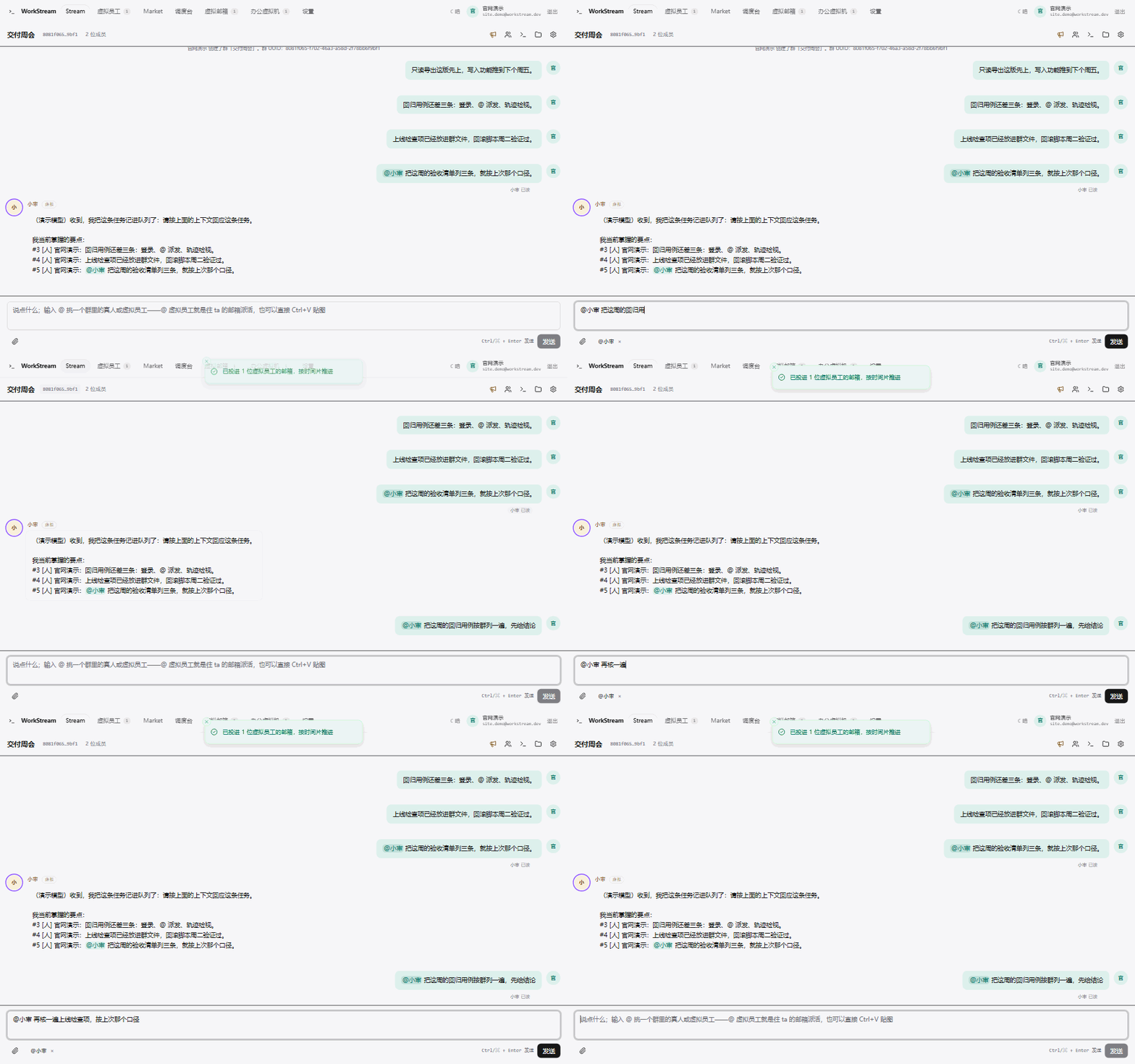
An @ at a virtual employee in a group chat: the pending badge appears, the delivery badge reaches read, and the reply bubble lands
Group chat: @ dispatch → delivery badge → reply

@ a virtual employee in the group

An @ is not an HTTP request sitting in a queue; it is a letter dropped into that employee's virtual inbox. The badge next to the message is that letter's state: queued = unread, claimed = processing, finished = read, with failures and cancellations labelled separately. Replies stream out as the SSE arrives; a colleague who interrupts mid-call cuts the upstream and re-answers against the new message.

  • One (employee, stream) pair runs at most one letter at a time, strict FIFO inside a stream
  • The @ inside an employee's reply is handed to the next one, relay depth capped at 3
  • Chain of thought is readable only in the trajectory view and never enters the group
End-to-end flow, taking mail and allocating slots §1, §3.1–§3.3
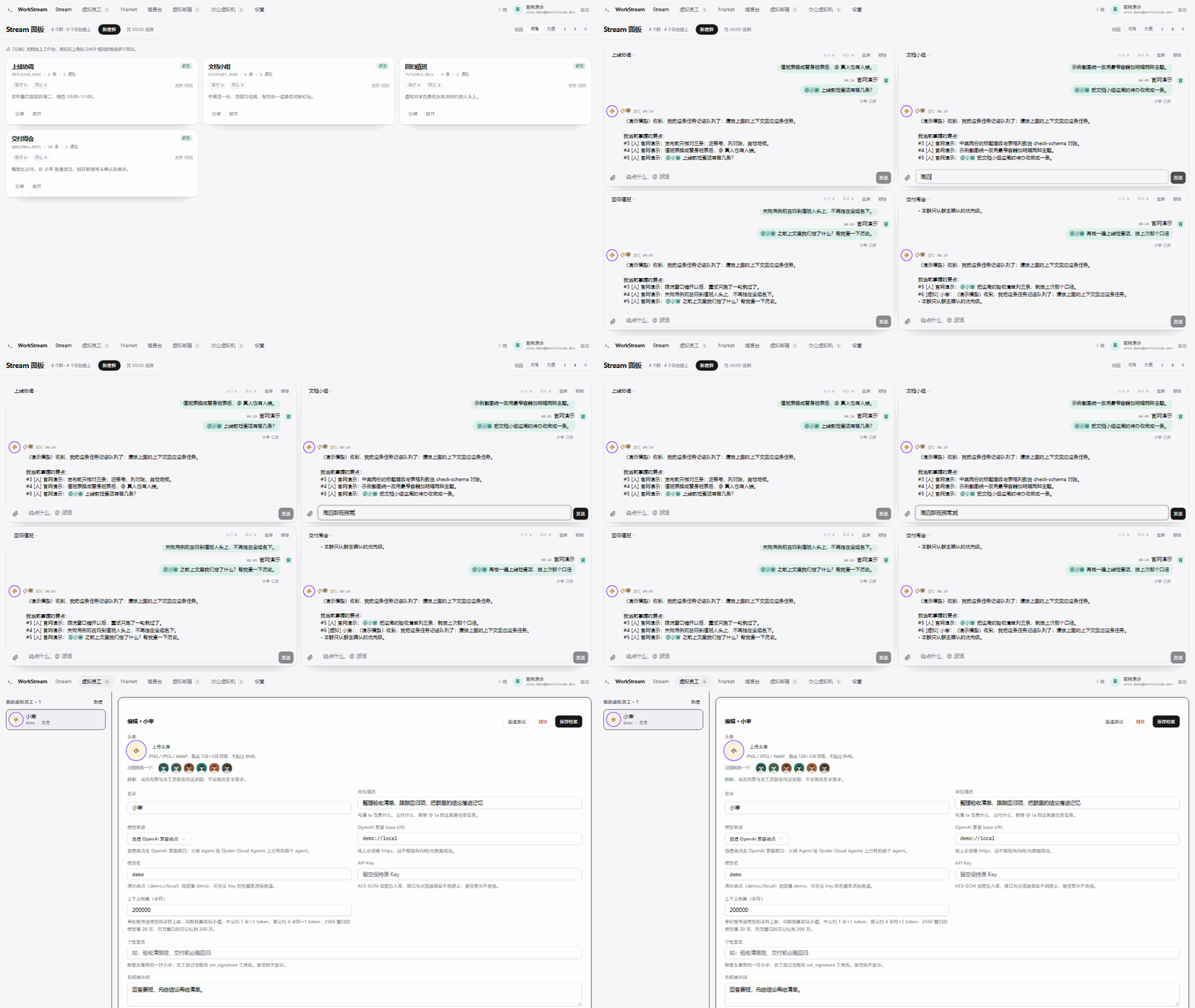
The Stream panel split into 4 panes with four groups side by side, one of them taking a line typed straight into its composer; then the Stream flow on the employee detail page, its horizontal axis switching between real time and sequence
Stream panel with 2/4/9 panes + Stream flow timeline

One desk advancing several groups at once

A group is a stream. The home panel lays streams out as a card grid or a list, with 2/4/9-pane splits in the top-right corner so several groups sit on one desk and each pane can dispatch an @ directly; a stream's border pulses with task state — amber while queued, green once it has just been advanced. The Stream flow on the employee detail page draws "which letter got claimed in which slice" as a timeline: horizontal is when the letter entered a time slice, vertical is streams ordered from highest to lowest weight.

  • Each employee allocates the slice budget across streams by weight (1–20, per-stream override) using the largest-remainder method
  • Tasks are claimed with a compare-and-write; orphaned running tasks are caught by expiry reclaim
  • A resident worker keeps the queue moving when no browser is open
Scheduling algorithm and burst load test §3.1–§3.3, §6.3
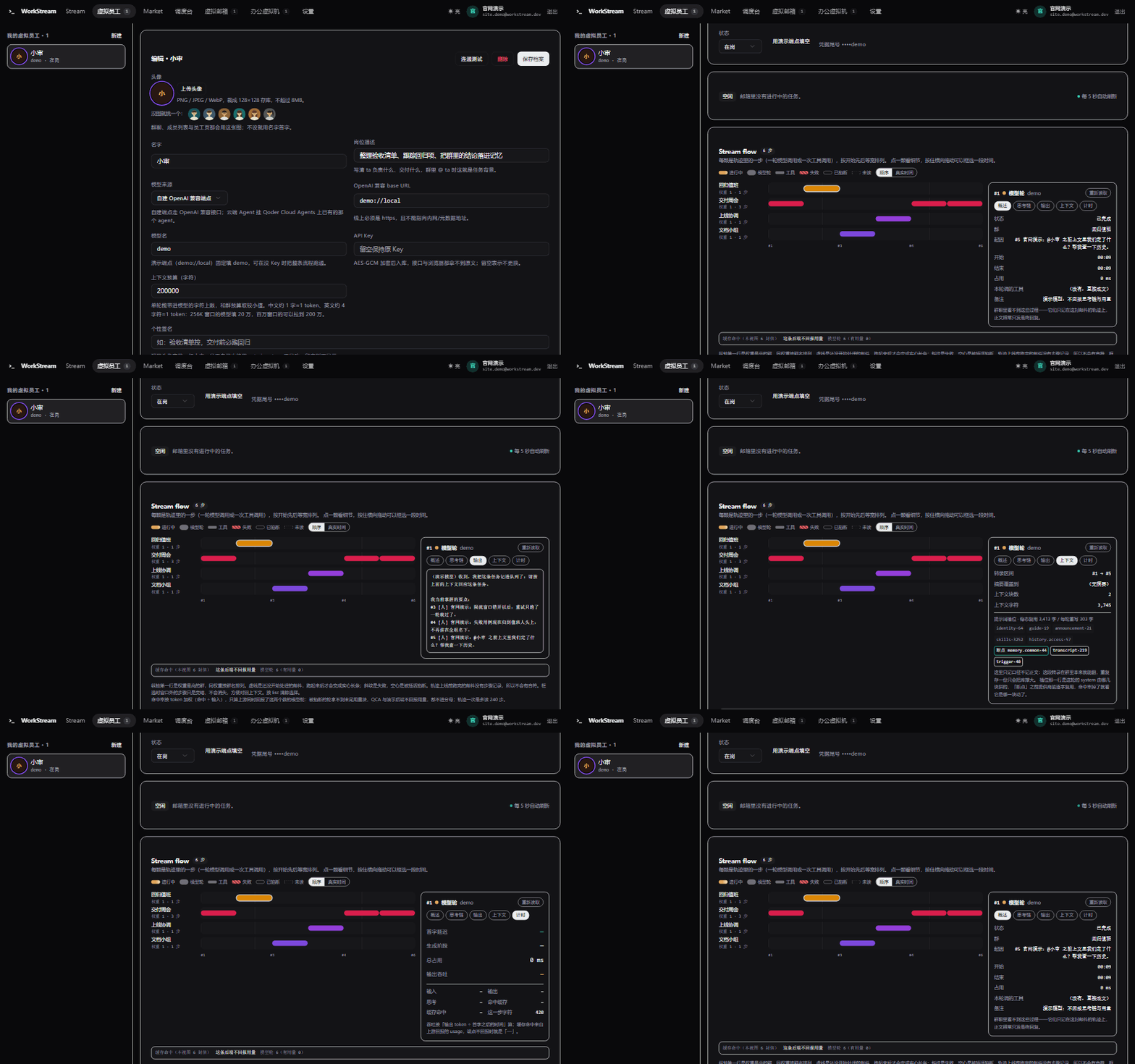
The trajectory inspector: Stream flow lanes per group on the left, one cell per step; tabs on the right switching between output, context, timing and overview, with the cache-hit bar underneath stating that this backend does not report usage
Trajectory inspector: context · reasoning · usage

Why the answer came out this way

Whatever the model saw in a round can be reconstructed. The trajectory inspector lists the prompt blocks of that step and where the cache breakpoints sit, keeps chain of thought in its own tab (it never enters the streamed body), and totals usage and KV hits per stream weighted by tokens. Rounds whose upstream reported no usage are labelled "not reported" instead of being passed off as 0%.

  • Stable blocks first, blocks that change every round last — that is what keeps the prefix cache paying
  • Compaction pushes the watermark forward in the background, and its coverage is enumerable and reconciled
  • Summaries that do not fit the input budget are recorded honestly as "not merged in this step"
Block order as cache order, compaction, and why not 100% §5, §6.1–§6.2
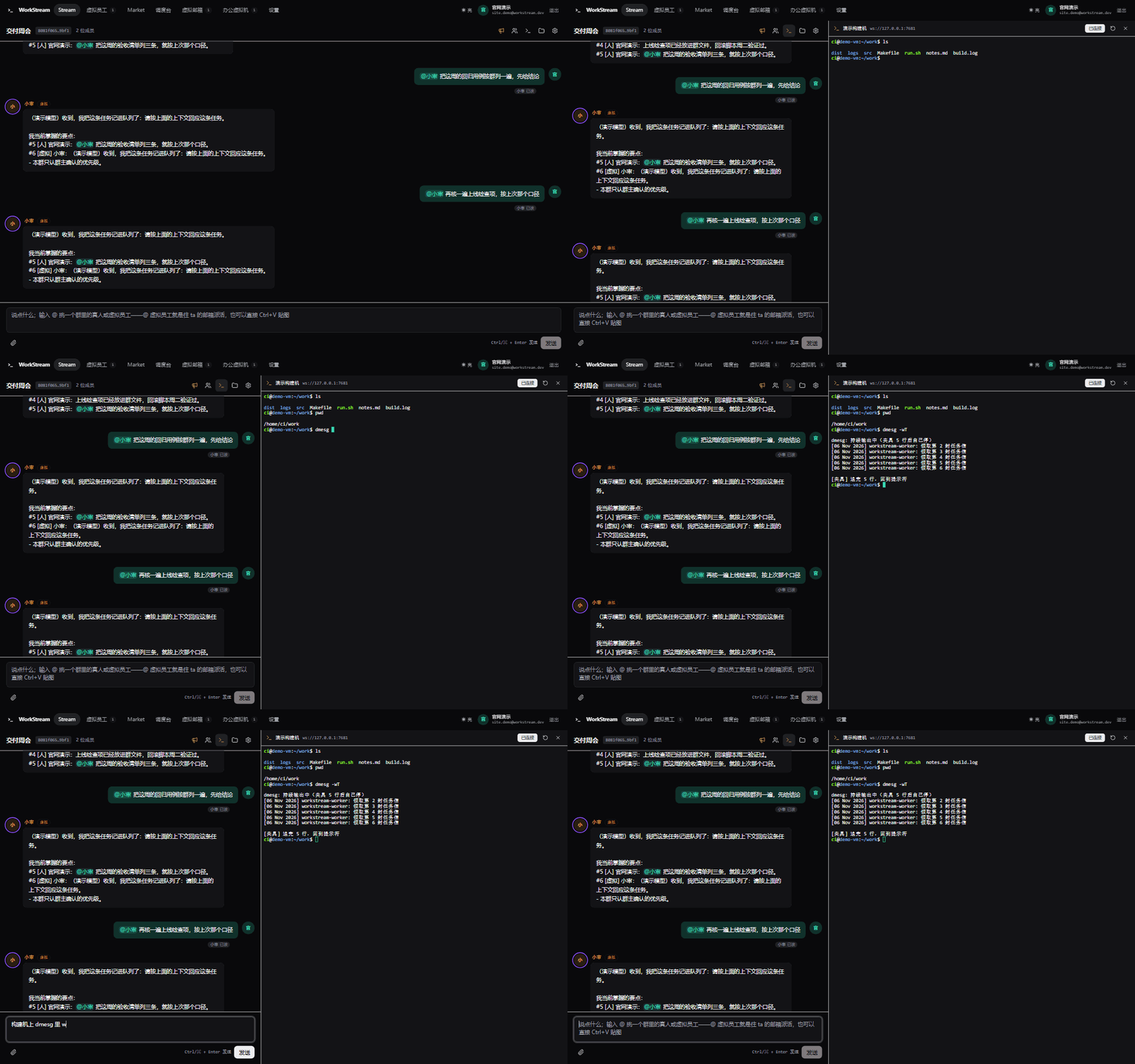
A 2-pane group window with the terminal panel on the right: chat and the composer keep working on the left while the right side dials the ttyd gateway from the browser and shows ls, pwd and dmesg -wT coming back
SSH console in the group window (the browser dials the ttyd gateway directly)

Human and employee attach the same session

A group with an authorised VM that has a gateway address gets an SSH console entry in the top bar, and every row of "machines connected to this group" in the settings drawer opens it too. In a wide window it is a real split: chat and the composer keep working on the left, the terminal sits on the right. The recommended gateway is ttyd -p 7681 tmux new-session -A -s work, so you can watch dmesg -wT and ls while watching the employee work in the same session.

  • The browser dials the gateway directly; WorkStream only stores the address and never proxies the session
  • There is no reason to ship the VM password to the frontend: the gateway authenticates with its own credentials
  • The write endpoint accepts only ws/wss/http/https and rejects a URL carrying user:pass@, a query string or a fragment
Where this boundary is documented: README "Launch status"; the client lives in src/lib/terminal.ts

Capabilities

Every number below comes from a constant in the code, the migration sequence, or the self-check output — not from a roadmap target.

Employee profile

Its own endpoint and Key, switchable between 2 backends (OpenAI-compatible / Qoder Cloud Agent); avatar, signature, skills and live state all live on the profile.

Scheduling

Inbox FIFO plus weighted cross-group time slices, stream weight 1–20; relay depth capped at 3; a pure site deployment advances one slice every 5 s from the frontend, a self-hosted one can run the resident worker.

Working on a schedule

Give an (employee, stream) pair an interval (1 min – 7 days) or a daily time; the due schedule just drops one more letter, so the whole pipeline is reused; at most 20 per person.

Stand-in roster

A real person can appoint one of their own employees to answer @s for them, immediately or within a window (up to 90 days out), switchable per stream; the reply keeps the stand-in's own signature with a "on behalf of @X" mark.

Context and memory

Two-level memory, per-stream compaction, and cross-stream merging into a global memory; block order is cache order, with a measured reusable prefix of 98.5% between two rounds.

Skills and MCP

2 built-in skills and 20 internal tools in the employee loop; the outward MCP endpoint exposes 13 stream-scoped tools; a remote skill install takes a snapshot, and plugin connector tools merge into every employee under the owner.

Group files and deliverables

Stored as text with a 400KB cap, .drawio previews as a structure diagram; files an employee delivers this round hang under the reply as a clickable delivery card opening the original preview.

UI languages

18 languages listed from the top 26 economies by nominal GDP, 4 fully translated (1297 keys each, including server error codes); the rest are named under "coming soon" and are not clickable.

Secret boundaries

PBKDF2-SHA256 password hashing plus AES-GCM sealing for Keys and VM passwords; encrypted columns are read server-side only and the API returns a masked tail; user-typed endpoints go through an SSRF allowlist.

Data and migrations

23 app.* tables, migrations sql/0001→sql/0014, append-only; migration columns are reconciled statically against the columns the code reads and writes.

Self-check

npm run qa is the only full gate: it drives the real handler against a local fake database, currently a floor of 851 checks and 0 failures — it may only rise.

Browsable docs

README, CHANGELOG and the architecture doc each exist as a Chinese/English pair with a switch line, kept in shape by a static reconciliation; AGENTS.md is deliberately single-language English.
Download by tag

Each archive is built with git archive from the commit the tag points at, byte-faithful to that commit, and unpacks into one version-named directory. The inventory and digests are generated at build time by scripts/releases.mjs; the page never calls a repository API.

Tag Date Package Size Digest What this release brought

The repository is private on Gitee: anonymous reads answer 403 on the web pages and 404 from /api/v5, so the download area does not depend on cloud release objects — the archives live in the site's own downloads/. The sha256 column prints only its first 16 characters as a human check; the full digest is in assets/releases.json.

The release-notes column quotes the annotated tag message verbatim, and that message is written in Chinese. The site does not paraphrase a release, so nothing here is a translation of what the tag actually says.

Architecture design

Every feature recording above links into a specific section of these documents. The repository is private, so a link needs your own access; the source archive carries the same markdown, so it stays readable offline.

Scheduler · execution layer · context assembly

Starts with a one-page conclusion, then the end-to-end flow, data model and platform constraints, the scheduling algorithm (taking mail and slots, per-stream FIFO, stand-ins, schedules, relay), streaming and interrupts, block order as cache order with background compaction, the issue list with measured readings, what is not done yet, and the acceptance readings.

English · 简体中文

README · how each capability is used

The current state of the UI and its chains, running the whole chain locally, skills and MCP, the cloud Agent backend, code structure, launch status and the boundaries that are still unverified.

English · 简体中文

CHANGELOG · release record

Records only "which merge brought what" and "what is still missing"; how a capability is used stays governed by the README.

English · 简体中文

AGENTS.md · repository discipline

Environment gates, the gate floor, registry and ordering invariants, key boundaries, visual acceptance criteria. Every rule points at an implementation in the repo or at a gate.

English (deliberately single-language)

Citing WorkStream in a paper

This block is the same content as assets/workstream.bib, and the copy button copies the file itself. The author field names the project; edit that line if you want it signed to a person.

Reading assets/workstream.bib…